

Google Chrome to identify and label slow websites - TechCrunch |
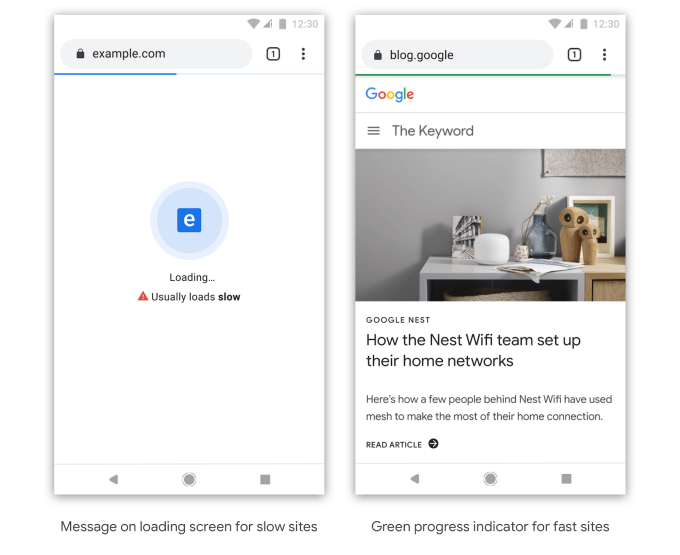
| Google Chrome to identify and label slow websites - TechCrunch Posted: 11 Nov 2019 11:30 AM PST Is it the web page that's slow or is it your network connection? In the future, Google's Chrome web browser may have an answer for you. Google announced today a plan to identify and label websites that typically load slowly by way of clear badging. The company says it may later choose to identify sites that are likely to be slow based on the user's device and current network conditions, as well. Google hasn't yet determined how exactly the slow websites will be labeled, but says it may experiment with different options to see which makes the most sense. For example, a slow-loading website may show a "Loading…" page that includes a warning, like a caution icon and text that reads "usually loads slow." Meanwhile, a fast website may display a green progress indicator bar at the top of the page instead of a blue one. And for links, Chrome may use the context menu to help users know if the site will be slow so you can decide whether or not you want to click.
In the long-term, Chrome's goal will be to identify and badge websites offering "high-quality" experiences, which may include other factors beyond just the website's speed. The company didn't yet detail what those other factors may be, but says the identification process will include more stringent criteria that's rolled out gradually over time. However, the goal will be to make these "good user experiences" something any web developer can achieve. In the meantime, Google suggests web developers visit its resources focused on site performance, including its learning platform web.dev./fast; online tool for optimization suggestions, PageSpeed Insights; and personalized advice tool, Lighthouse. A faster, more usable web benefits Google, as it helps the company better cater to its primarily mobile users. Since 2015, the majority of Google users start their searches from mobile devices. But that shift has required new ways of indexing and ranking pages and serving users whose connection speeds vary and who may not have powerful devices. Google now uses a website's mobile version when indexing its pages, and it offers fast AMP pages to help mobile users get to information more quickly. It makes sense that a next step would be to nudge site owners themselves to speed things up or risk getting labeled as a "slow" website. This sort of feature would particularly help Google users in emerging markets, like India, where decent bandwidth is often lacking and low-end smartphones are prevalent. "Speed has been one of Chrome's core principles since the beginning – we're constantly working to give users an experience that is instant as they browse the web," a Chrome blog post explained. "That said, we have all visited web pages we thought would load fast, only to be met by an experience that could have been better. We think the web can do better…," it read. The plans were announced at the Chrome Developer Summit, alongside other developer-focused updates. This included a preview of "Web Bundles," an API that lets developers distribute web content across any format, like email, FTP or even USB. Plus, Portals, a web experience previously announced at Google I/O, was demonstrated with early partner Fandango.  |
| Here’s how to set up the Google Site Kit WordPress plugin - Search Engine Land Posted: 11 Nov 2019 12:37 PM PST 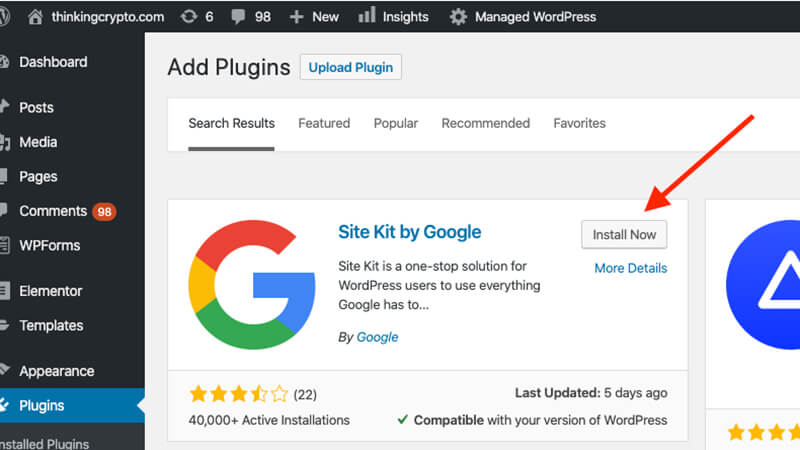 On Oct. 31, Google announced the launch of its Site Kit WordPress plugin that, "enables you to set up and configure key Google services, get insights on how people find and use your site, learn how to improve, and easily monetize your content." This plugin allows you to easily connect the following Google Services in a dashboard format within your WordPress backend:
It brings the convenience of accessing your site's performance data while logged into the backend of the site. This is great for webmasters, developers and agencies who are often an admin for their own site or a client's WordPress site. However, it does not offer the robust and dynamic capabilities of a Google Data Studio report or dashboard to sort data so it may not be ideal for a digital marketing manager or CMO. With that said, it wouldn't hurt to implement this plugin as it's actually a nifty tool that can help you stay on top of your site's performance metrics. It's also another way to give Google more access to your site which can have some in-direct benefits organically. Here is what the Google Site Kit plugin looks like within the WordPress plugin directory. 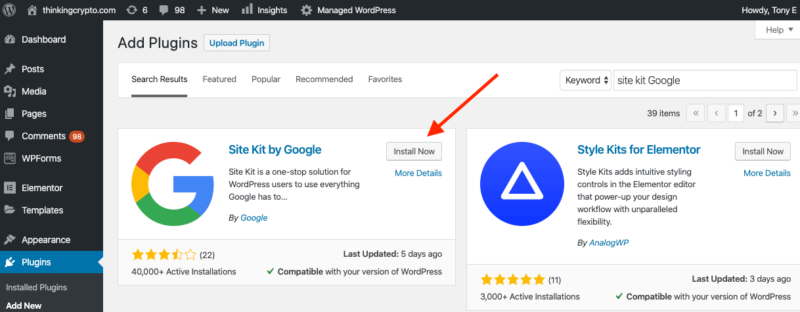 Installing and setting up Google Site KitTo utilize the plugin, simply click install and activate as you would any other WordPress plugin. You will then be prompted to complete the set up. Step 1 Click on the "Start Setup" button. 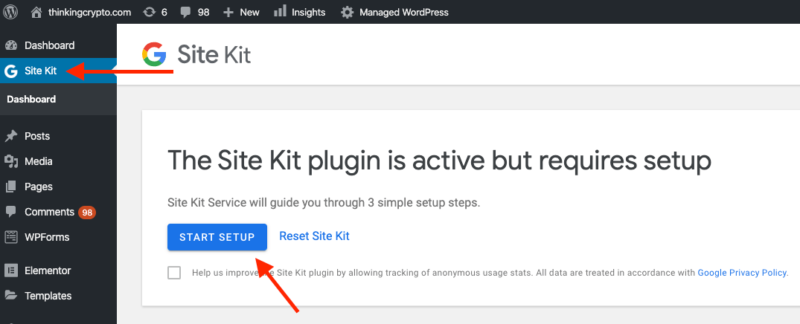 Step 2 You will be prompted to give access to your site's Google Search Console profile, which means you need to sign in to the Gmail account that has access to your site's Search Console profile.  Step 3 Once logged in you need to grant permissions for Google to access the data in your Search Console profile. 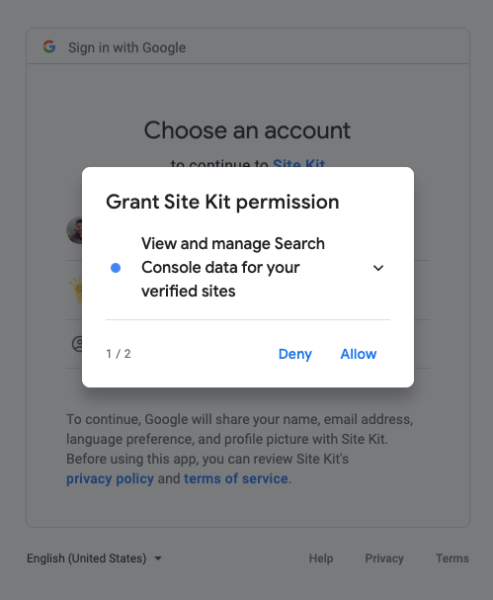 Step 4 Once you've granted all the respective permissions, you will get a completion notification and can then click on "Go to my Dashboard." Step 5 Once you're in the Dashboard you will see options to connect other services such as Analytics, AdSense and PageSpeed insights. You can now choose to connect these services if you like. If you go to the settings of the plugin you will see additional connection options for Optimize and Tag Manager. 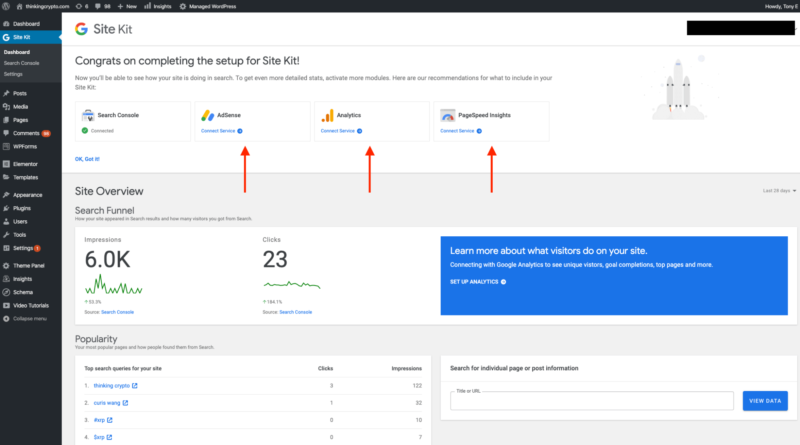  Here is what the dashboard looks like with Search Console, analytics and PageSpeed Insights enabled. You can see a clear breakdown of the respective metrics.   The plugin allows you to dive into each reporting respectively with navigation options on the left to drill down into Search Console and analytics.   There is also an admin bar feature to see individual page stats. 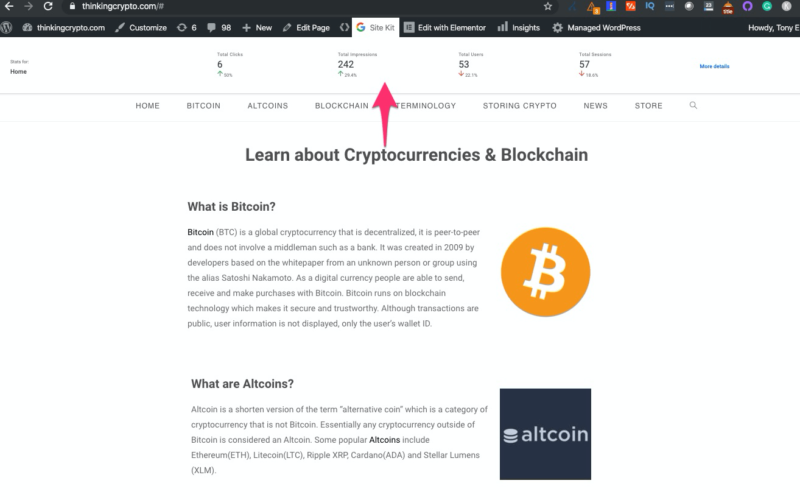 In summary, this is a great plugin by Google but keep in mind it's just version 1.0. I'm excited to see what features and integrations the later versions will have! Opinions expressed in this article are those of the guest author and not necessarily Search Engine Land. Staff authors are listed here. About The Author Tony Edward is a director of SEO at Tinuiti and an adjunct instructor of search marketing at NYU. Tony has been in the online marketing industry for over 10 years. His background stems from affiliate marketing and he has experience in paid search, social media and video marketing. Tony is also the founder of the Thinking Crypto YouTube channel.  |
| You are subscribed to email updates from "google page insights" - Google News. To stop receiving these emails, you may unsubscribe now. | Email delivery powered by Google |
| Google, 1600 Amphitheatre Parkway, Mountain View, CA 94043, United States | |







0 Yorumlar